Bloom filters, HyperLogLog and count-min sketch
Probabilistic data structures for system design interviews: Bloom filters for membership, HyperLogLog for counting distinct items, count-min sketch for frequencies and heavy hitters, with sizes, error rates and where each is used.
Reading is half of it. See this used in a real interview: walk through Design a Web Crawler →
Some questions are expensive to answer exactly and cheap to answer approximately. "Have we seen this URL before?" across ten billion URLs, "how many unique visitors today?" across a billion events, "which search terms are trending right now?" over a firehose. Probabilistic data structures answer them in kilobytes or megabytes instead of terabytes, with an error you choose in advance. Naming the right one, with its size and error, is a strong signal in an interview.
Bloom filters: "definitely not" or "probably yes"
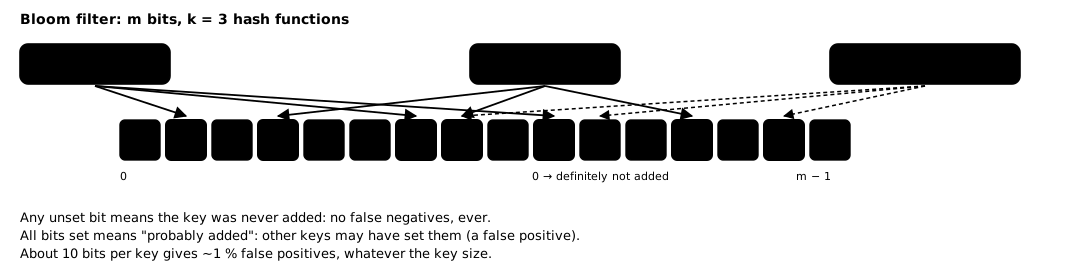
A Bloom filter is a bit array of m bits and k hash functions. To add a key, set the k bits it hashes to. To check a key, look at its k bits: if any is 0, the key was definitely never added; if all are 1, it was probably added (the bits may have been set by other keys).
- No false negatives: anything added always answers "probably yes".
- False positives at a rate you choose: about 1 % with ~10 bits per element and 7 hash functions; 0.1 % with ~15 bits.
- No deletion in the basic form (a counting Bloom filter or a cuckoo filter supports it).
Size: 10 billion URLs at 1 % false positives is 10 bits × 10 B = 100 Gbit ≈ 12 GB, versus hundreds of GB for the URLs themselves.
Where it is used:
- Skipping disk reads: LSM-tree stores keep a Bloom filter per file so a read checks only files that might hold the key. See database indexing.
- "Seen before?" at scale: a crawler’s URL-seen check (Design a Web Crawler), "already shown this profile" in a dating app (Design Tinder), duplicate event detection.
- Negative caching: answer "this key does not exist" without hitting the database. See caching.
The one-sided error decides where it fits: use it when a false "probably yes" just costs an extra exact check, never when it would wrongly reject something.
HyperLogLog: counting distinct things
Counting unique visitors exactly means remembering every visitor id. HyperLogLog estimates the number of distinct items using a few kilobytes, regardless of how many items there are.
The intuition: hash each item; in random hashes, a run of k leading zeros appears about once every 2^k distinct values. Tracking the longest run seen (across many small buckets, then averaging) estimates how many distinct values have passed.
- Size: about 12 KB for a standard error of 0.81 % (Redis’s implementation), whether you count a thousand or a billion items.
- Mergeable: the union of two HyperLogLogs is computed by merging them, so you can keep one per hour and combine them into a day, or one per shard and combine them globally.
Where it is used: unique visitors or users per page per day, distinct search queries, cardinality of a metric’s labels (metrics and monitoring), unique viewers of a story. Redis provides it as PFADD / PFCOUNT / PFMERGE.
Count-min sketch: how often, roughly
A count-min sketch estimates how many times each item appeared in a stream. It is a small grid of counters: d rows, each with its own hash function, w counters wide. Adding an item increments one counter per row; the estimate is the minimum of the item’s d counters.
- Estimates are never too low, and too high by at most a small fraction of the total count, with a probability you choose through w and d.
- A few hundred KB handles streams of billions of events.
Heavy hitters / top-K: pair the sketch with a small heap of the current top K. For each event, update the sketch, read the item’s estimate, and if it beats the smallest entry in the heap, replace it. This is how "trending searches in the last 5 minutes" is computed in a streaming job without counting every query exactly. See Design Search Autocomplete and batch and stream processing.
Others worth naming
| Structure | Answers | Notes |
|---|---|---|
| Cuckoo filter | membership, with deletion | similar space to Bloom at low error rates |
| t-digest | percentiles (p50, p99) of a stream | mergeable across hosts, unlike averaging percentiles |
| MinHash | similarity of two sets | near-duplicate detection; see the crawler’s SimHash discussion |
| Reservoir sampling | a uniform random sample of a stream | fixed memory regardless of stream length |
Choosing and sizing in an interview
- State the exact version and why it is too big: "an exact set of 10 B URLs is ~1 TB".
- Name the structure and its guarantee: "a Bloom filter has no false negatives; at 1 % false positives it needs 10 bits per URL".
- Give the size: "~12 GB, sharded by host across crawler nodes".
- Say what happens on an error: "a false positive means we skip a URL we had not crawled, about 1 in 100; acceptable for a crawler, or confirm against the URL store".
Pitfalls
- Filling a Bloom filter past its design size raises the false-positive rate sharply. Size for growth, or rebuild larger.
- Exact counts sometimes matter: billing, quotas and anything with money must use exact counts, with sketches only for dashboards and trends.
- Merging requires the same parameters: HyperLogLogs and sketches can only be merged if built with the same size and hash functions.
Checklist
- The exact approach and its size, to justify the approximation.
- The structure, its error type (false positives, overestimates) and rate.
- Memory needed, and whether it is per shard, per window or global.
- What an error costs the user, and whether an exact check follows.
- Whether you need merging across time windows or shards.